

Mechanical keyboards in 2026 are a two-tier market. The mainstream tier is the $80-150 prebuilt hot-swap keyboard with reliable Cherry, Gateron, or Kailh switches, a solid plastic or aluminum case, and software that lets you rebind keys without reflashing firmware. The enthusiast tier is the $200-350 custom mechanical keyboard with magnetic Hall Effect switches, an aluminum case, double-shot PBT keycaps, a gasket-mount design for sound, and per-key actuation adjustment. Both tiers are worth buying in 2026, and the right pick depends on whether you want to swap switches yourself or just want a good keyboard out of the box.
The 2026 mechanical keyboard field is the most competitive it has been in a decade. Magnetic Hall Effect switches have gone mainstream after Wooting proved the use case for gamers in 2022-2023, and Keychron, Lemokey, Corsair, and the rest of the industry have followed with their own HE lines. The custom keyboard community has settled on QMK and VIA as the open-source firmware standards, which means a $200 keyboard in 2026 has the same customisation depth as a $400 keyboard in 2024. This guide ranks the 2026 mechanical keyboard field for the three things that matter: typing feel, switch quality and availability, and software ecosystem.
What "mechanical keyboard" actually means in 2026
A mechanical keyboard uses individual mechanical switches for each key, as opposed to the rubber dome or scissor mechanism on a laptop keyboard. The switch is a small plastic housing with a spring and a stem, and the key press registers when the stem moves past a certain point, either physically (a traditional mechanical switch) or electromagnetically (a Hall Effect switch). The traditional mechanical switch has been the standard for custom keyboards since the 1980s, the Cherry MX switch and its clones, and the Hall Effect switch is the new generation, with adjustable actuation points, rapid trigger, and analog input that the traditional switch cannot do.
The three things that matter in 2026 are switch feel, switch availability, and software. Switch feel is subjective, and the only way to know what you like is to try several switches, which is why hot-swap PCBs are now standard on every keyboard above $100. Switch availability is the practical constraint. Traditional Cherry MX and Gateron switches are interchangeable across every keyboard, but Hall Effect switches are not, Keychron HE switches only fit Keychron HE keyboards, Wooting HE switches only fit Wooting HE keyboards, and the industry has not converged on a common HE socket standard. Software is the third leg. QMK and VIA are the open-source standards, and every enthusiast keyboard in 2026 supports one or both.
At a glance
| Field | Detail |
|---|---|
| Best overall prebuilt | Keychron Q1 HE (75%, magnetic HE switches, $219) |
| Best value prebuilt | Keychron V5 Max (96%, traditional MX, $169) |
| Best for gaming | Wooting 60HE (60%, analog HE switches, $175) |
| Best for office | Logitech MX Mechanical (TKL, low-profile MX, $149) |
| Best budget | Keychron K2 HE (75%, magnetic HE, $109) |
| Best full-size | Keychron Q6 HE (full-size, magnetic HE, $239) |
| Hall Effect (HE) switch standard | Not yet unified; Keychron, Wooting, and others use proprietary sockets |
| Software standard | QMK / VIA (open-source, supported by most enthusiast keyboards) |
The 2026 mechanical keyboard field
| Keyboard | Layout | Switch type | Hot-swap | Connectivity | Price | Best for |
|---|---|---|---|---|---|---|
| Keychron Q1 HE | 75% | Magnetic HE (Gateron 2.0 Nebula) | Yes (HE only) | 2.4G + BT 5.1 + USB-C | $219 | All-round enthusiast |
| Keychron V5 Max | 96% | Traditional MX (Gateron Jupiter Brown) | Yes (MX) | 2.4G + BT 5.1 + USB-C | $169 | Value prebuilt |
| Wooting 60HE v2 | 60% | Analog HE (Wooting Lekker) | Yes (HE only) | USB-C wired | $175 | Competitive gaming |
| Logitech MX Mechanical | TKL | Low-profile MX (Kailh Choc) | No | Logi Bolt + BT | $149 | Office / quiet |
| Keychron K2 HE | 75% | Magnetic HE (Gateron 2.0) | Yes (HE only) | 2.4G + BT 5.1 + USB-C | $109 | Budget HE entry |
| Keychron Q6 HE | Full-size | Magnetic HE (Gateron 2.0) | Yes (HE only) | 2.4G + BT 5.1 + USB-C | $239 | Full-size with numpad |
| Logitech G Pro X TKL | TKL | Traditional MX (GX tactile) | Yes (MX) | USB-C wired, Lightspeed wireless | $199 | Esports / tournament |
| Corsair K70 CORE | Full-size | Traditional MX (MLX Red) | Yes (MX) | USB-C wired | $159 | Full-size gaming |
The eight keyboards above are the ones to consider in 2026. The Keychron Q-series is the strongest custom keyboard line at the price, the Wooting 60HE is the only analog HE keyboard worth buying for gaming, and the Logitech MX Mechanical is the office default.
The picks
Best overall: Keychron Q1 HE
The Q1 HE is the first keyboard to combine the three things that matter in 2026, a premium aluminum case, a gasket-mount design for sound and feel, magnetic Hall Effect switches with adjustable actuation, and QMK/VIA firmware support. The prebuilt ships with Gateron 2.0 Nebula linear HE switches, a 40g starting force and 60g bottom-out, and the actuation range is 0.5 to 3.8mm adjustable per key in 0.1mm increments. The 1,000 Hz polling rate over 2.4GHz wireless is the same as wired, which is the latency that matters for gaming.
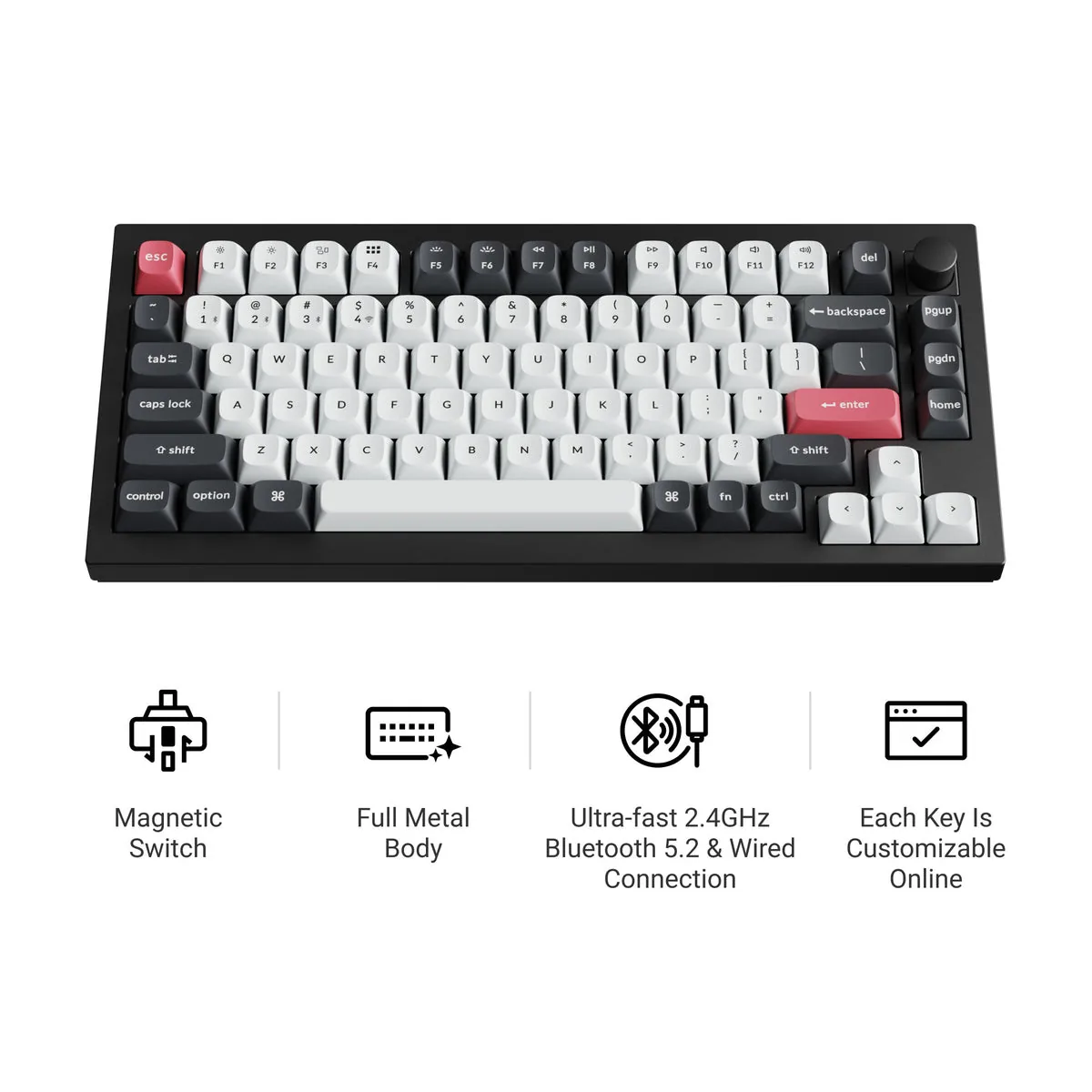
At $219, the Q1 HE is at the high end of the prebuilt custom keyboard market, but the build quality is the right reason. The 6063 aluminum top and bottom case is 1.7 kg, the gasket mount with sound-dampening foam is the same construction as keyboards twice the price, and the Keychron Launcher web app for HE switch customization is the cleanest software in the category. The downsides: only Gateron 2.0 HE switches are compatible, which limits your customisation to Keychron's own switch line, and the 75% layout drops the F-row and the navigation cluster.
Best value: Keychron V5 Max
The V5 Max is the right pick for buyers who want a custom keyboard without paying custom prices. The 96% layout is the sweet spot between the 75% and the full-size, the prebuilt ships with Gateron Jupiter Brown tactile switches, and the QMK/VIA firmware support means the customisation depth is the same as the Q1 HE. The 2.4GHz wireless latency is the same as the Q1 HE, and the 1,000 Hz polling rate over the wireless dongle is gaming-grade.
At $169, the V5 Max is $50 less than the Q1 HE, and the tradeoff is the switch type. Traditional MX switches are interchangeable across every keyboard, which is a real advantage if you want to try different switches, but they do not have the adjustable actuation or the rapid trigger of HE switches. For a typist who does not game competitively, the V5 Max is the right pick. For a competitive gamer, the HE switches on the Q1 HE are worth the upgrade.
Best for gaming: Wooting 60HE v2
The Wooting 60HE is the keyboard that proved the Hall Effect use case for gaming, and the v2 is the 2026 refresh. The analog HE switches measure key travel continuously, which means a partial key press registers as a partial input, the same as a controller joystick. For competitive shooters, this enables movement techniques that are not possible on a traditional digital keyboard, and the rapid trigger feature lets you reset the actuation point instantly without lifting the key.
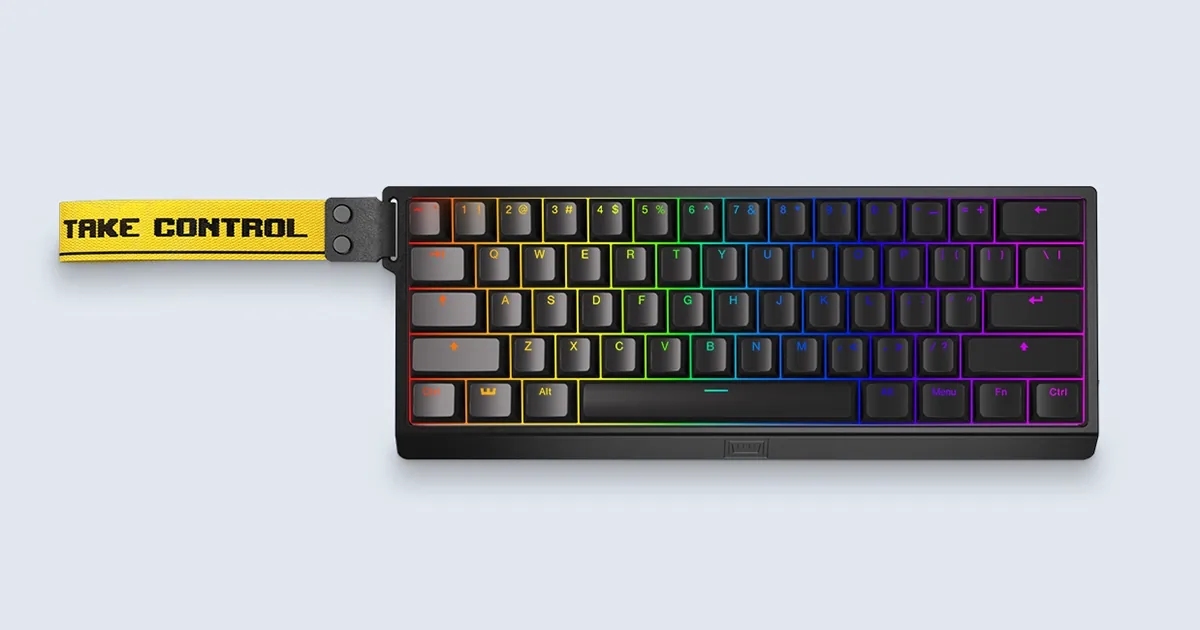
At $175, the 60HE v2 is the same price tier as the Q1 HE, and the tradeoff is the layout. The 60% layout drops the arrow keys, the F-row, and the navigation cluster, which is a deal-breaker for typists and most office workers. The 60HE v2 is a gaming keyboard, not a daily driver, and the right answer if your primary use is competitive FPS or fighting games. For mixed use, the Q1 HE is the better pick.
Best for office: Logitech MX Mechanical
The MX Mechanical is the office default for buyers who want a mechanical keyboard that does not sound like a mechanical keyboard. The low-profile Kailh Choc switches are 40% shorter than standard MX switches, which gives the keyboard a laptop-like typing angle, and the sound is significantly quieter than standard MX. The Logi Bolt receiver and Bluetooth connectivity work with up to three devices, and the Logi Options+ software handles the multi-device switching automatically.
At $149, the MX Mechanical is the right pick for office workers who want the typing feel of a mechanical keyboard without the noise or the form factor. The tradeoff is the lack of hot-swap sockets, which means you cannot change the switches yourself, and the Logi Options+ software is the only firmware tool, no QMK/VIA. For a buyer who wants to customise the keyboard, the Keychron V5 Max is the better pick. For a buyer who wants a quiet, well-built office keyboard that works out of the box, the MX Mechanical is the right answer.
Best budget: Keychron K2 HE
The K2 HE is the cheapest way to get a Hall Effect mechanical keyboard in 2026. The 75% layout, the QMK/VIA support, the 2.4GHz wireless, the hot-swap HE sockets, all the features of the Q1 HE at $109 instead of $219. The tradeoff is the case, the K2 HE uses a plastic case instead of the aluminum case on the Q1 HE, and the gasket mount is less refined, which means the sound is thinner and the typing feel is less solid.
For a buyer who wants to try magnetic HE switches without committing to the $200+ tier, the K2 HE is the right pick. For a buyer who is going to use the keyboard for years, the aluminum case on the Q1 HE is worth the upgrade. The K2 HE is the budget pick. The Q1 HE is the all-rounder. The V5 Max is the value pick for non-HE buyers.
Best for full-size: Keychron Q6 HE
The Q6 HE is the full-size variant of the Q1 HE, the same aluminum case, the same gasket mount, the same Gateron 2.0 HE switches, with a numpad and the full F-row. For buyers who need the numpad for work (accounting, data entry, CAD) or who just prefer the full-size layout, the Q6 HE is the right answer. The 96% V5 Max is a smaller alternative that drops the numpad but keeps the F-row, and the right answer depends on the desk space and the personal preference.
At $239, the Q6 HE is $20 more than the Q1 HE, and the upgrade is the case size. Same build quality, same switches, same software. The only real question is whether you need the numpad.
What to look for in 2026
Three things separate a mechanical keyboard that will be good in 2026 from one that will be obsolete in two years.
Hot-swap sockets
Hot-swap sockets let you change the switches without soldering, which is the only way to test switch feel and the only way to upgrade a keyboard over time. Every keyboard in this guide above $100 has hot-swap sockets. The MX standard sockets accept every MX-style switch from every manufacturer, which is the right standard. The HE standard is not yet unified, Keychron uses Gateron 2.0, Wooting uses Wooting Lekker, and the two are not interchangeable. For 2026, buy an MX keyboard if you want to try different switches over time. Buy an HE keyboard if you want the gaming features and accept the proprietary switch ecosystem.
QMK / VIA support
QMK and VIA are the open-source firmware standards for custom keyboards, and the right answer for any keyboard in 2026. Both let you rebind any key, set up macros, configure layers, and update the firmware without installing a vendor app. Logi Options+, Razer Synapse, and Corsair iCUE are the proprietary alternatives, and the problem with proprietary software is that the vendor can stop supporting the keyboard in two years when they move on to the next product. QMK and VIA are open-source, which means the keyboard works for as long as the hardware works. Every enthusiast keyboard in 2026 should support QMK or VIA.
Per-key actuation adjustment (HE)
If you go Hall Effect, the per-key actuation adjustment is the feature that matters. The Q1 HE and the Wooting 60HE both let you set the actuation point per key in 0.1mm increments, which means a light touch for the WASD keys and a heavier touch for the modifier keys, or any other combination. The Logitech G Pro X TKL does not have HE switches, and the actuation is fixed. For a competitive gamer, the per-key adjustment is the difference between a top-tier HE keyboard and a good-but-not-great one.
What to skip in 2026
Skip the keyboards that use proprietary software and do not support QMK/VIA. The Razer Huntsman line, the Corsair K-series, the SteelSeries Apex line, all have good hardware, but the vendor lock-in means the keyboard is unusable 3-5 years from now when the vendor stops updating the software. For 2026, QMK/VIA is the bar. Skip the "75% with arrow keys but no F-row" layouts that some manufacturers call 75%, the Q1 HE is a true 75% with the F-row and the navigation cluster, and the layout is the standard one that the custom keyboard community uses. Skip the keyboards that ship with proprietary switches that you cannot buy anywhere else, the Hall Effect problem is real, and the proprietary switches on the Wooting and the Keychron are the only switches that fit those keyboards.
Who should buy which
All-rounder who wants a premium keyboard for typing and gaming, the Keychron Q1 HE. Buyer on a budget who wants the best value, the V5 Max. Competitive gamer who needs analog HE, the Wooting 60HE. Office worker who wants a quiet mechanical keyboard, the Logitech MX Mechanical. Buyer who wants to try HE without the premium price, the K2 HE. Buyer who needs a numpad, the Q6 HE.
One last note. The mechanical keyboard market in 2026 is the best it has ever been. The customisation depth that used to require a soldering iron is now plug-and-play with hot-swap sockets. The firmware that used to require command-line compilation is now a web app. The switches that used to require a $200 order from a custom manufacturer are now in stock at $40 for a set of 90. The right answer for most buyers in 2026 is to spend $150-220 on a hot-swap QMK keyboard with the switches you like, and the keyboard will be good for 5-10 years.
Frequently asked questions
What is a Hall Effect keyboard
A mechanical keyboard with magnetic switches that measure key travel electromagnetically instead of through physical contact. Hall Effect keyboards support adjustable actuation points, rapid trigger, and analog input, all features that traditional mechanical switches cannot do. The tradeoff is the proprietary switch ecosystem.
Are Hall Effect switches better than Cherry MX
For gaming, yes. Hall Effect switches enable features that traditional switches cannot, including adjustable actuation, rapid trigger, and analog input. For typing, no. Traditional MX switches have been refined for 40 years, and the feel is better than HE switches for most typists. Buy HE for gaming, buy MX for typing.
What is QMK and why does it matter
QMK is the open-source keyboard firmware standard. It lets you rebind any key, set up macros, configure layers, and update the firmware without installing a vendor app. For 2026, QMK is the right answer for any keyboard you plan to use for more than two years.
How long do mechanical keyboards last
Most quality mechanical keyboards last 5-10 years with normal use. The traditional MX switches are rated for 50-100 million presses per key. The HE switches are rated for similar lifespans, but the long-term data is not yet available because the technology is new.
Should I buy a prebuilt or build my own
For most buyers in 2026, prebuilt is the right answer. The Keychron Q1 HE and the V5 Max are prebuilt keyboards with the same build quality as a custom build, at half the price. For buyers who want the specific switches, keycaps, or case that no prebuilt offers, custom is the right answer, but the custom build workflow takes 8-20 hours and the parts cost is $300-500.
Are mechanical keyboards loud
Yes, but the loudness varies. The Cherry MX Blue and the Kailh Box White are loud, the Cherry MX Brown and the Gateron Brown are moderate, the Cherry MX Red and the linear switches are quiet. The low-profile MX switches on the Logitech MX Mechanical are quieter than standard MX. The HE switches on the Keychron Q1 HE are quieter than the linear MX because the magnetic actuation has no physical contact sound.
Sources
- RTINGS — Best Mechanical Keyboards 2026 — full 2026 test methodology with HE and MX keyboard picks
- Tom's Hardware — Keychron Q1 HE Review — magnetic HE switch review, 1,000 Hz polling, build quality
- Macworld — Keychron Q1 HE QMK Review — macOS perspective, build quality, software experience
- WIRED — Keychron Q1 HE Review: Hall Effect Goes Mainstream — ecosystem perspective, HE switch compatibility analysis
- RTINGS — Logitech G PRO X TKL Review — esports keyboard with traditional MX switches


Loading comments…